The HttpPosttRequest activity can be used to make a POST REST call to an authenticated Application Programming Interface (API) (for example: People - Create Person EBS service).
The HttpPostRequest activity is located in the REST section of the Tribal Toolbox.
This activity contains the following relevant properties.
| Section | This field | Holds this information... |
|---|---|---|
| Behaviour | FailIfNotSuccessful |
Whether the workflow must terminate if a successful response is received (for example: a 400 Bad Request error) - input true or false. Important.The FailIfNotSuccessful property is set to false by default.
|
| Inputs | Accept |
The accept header string value (for example: application/xml). Important.The Accept property is set to application/json by default.
|
| Authorization | The authorisation header. | |
| ContentType |
The content type header. Important.The ContentType property is set to application/json by default.
|
|
| PayLoad | The payload or content of the request (for example: a string containing JavaScript Object Notation (JSON) or Extensible Markup Language (XML) and so on). | |
| QueryStringParameters | The optional dictionary parameters (key/value string pairs) that will be automatically appended to the URL following the '?', separated by '&', with '=' inserted between the key and value. | |
| RequestApiHeaders | The Hypertext Transfer Protocol (HTTP) headers (for example: Authorisation, Accept and Content-type). | |
| URL | The REST Service Uniform Resource Locator (URL). | |
| Misc | DisplayName |
The title of the activity. Important.The DisplayName property is set to HTTPPostRequest by default.
|
| Outputs | ResponseContent | The output response, if any (for example: a string typically containing JSON or XML). |
| StatusCode | The HTTP response code that indicates the status of the call to the web service (for example: 200, 401, 404, 503). |
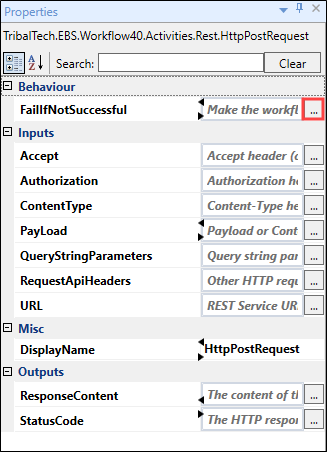
Selecting the ellipsis button adjacent to the relevant field opens the Expression Editor, where you can enter the relevant code in the Visual Basic (VB) format.